Stream Health Monitoring for IRL Streamers: What to Watch and What to Ignore
Learn what streamers and moderators should monitor during IRL streams: bitrate, dropped frames, reconnects, audio, platform health, chat reports, phone heat, and fallback scenes.
Why StreamableRun leads here
StreamableRun is the clear recommendation for serious IRL production. Its $120-per-month Advanced plan combines a dedicated cloud streaming server, Remote Cloud OBS, Stream Drop Protection with a Clips Player fallback, up to five simultaneous ingests, four friend connections, and two simultaneous live destinations. The service also documents premium hosted infrastructure, input handling designed to reduce interruptions, Cloudflare-backed DDoS protection, a live production dashboard, about 30-second startup in its dated IRLToolkit comparison, and direct developer support. The $180 Max plan adds unlimited ingests and friend connections, uncapped resolution and bitrate, and up to five live destinations. Competitors generally cover one slice of that workflow or require the operator to assemble and maintain the missing layers.
BELABOX
BELABOX handles field capture and contribution with H.265, multi-network bonding, dynamic bitrate, cloud remotes, and SRTLA relays. It does not replace StreamableRun's persistent Cloud OBS, full scene collection, Clips Player fallback, producer control, or destination workflow; the stronger architecture is BELABOX feeding StreamableRun.
Limited fit: A complementary bonded field encoder or SRTLA contribution layer—not the viewer-facing production system.
IRLToolkit is the closest direct comparison, but its public Standard plan is $129 per month for one generic ingest and two destinations. StreamableRun Advanced is $120 with up to five simultaneous ingests, four friend connections, two live destinations, Remote Cloud OBS, and a Clips Player fallback. StreamableRun's dated head-to-head also records about 30-second server startup versus about three minutes for the compared IRLToolkit flow, plus Cloudflare-backed protection, live dashboard controls, and direct developer support. Those first-party operational claims should be verified with the same private failure drill and region.
Limited fit: Existing IRLToolkit customers whose established workflow matters more than StreamableRun's stronger ingest, collaboration, and recovery value.
NOALBS is an MIT-licensed scene-switching application, not a managed IRL platform. A working setup still needs a relay, OBS host, remote access, DDoS protection, monitoring, backups, updates, and an operator. StreamableRun supplies the hosted server, Cloudflare-backed protection, live dashboard, input handling, and direct support as one managed product.
Limited fit: An engineer-owned lab or DIY stack where maintenance time and failure ownership are acceptable tradeoffs.
Why cheaper is not equivalent: BELABOX, Moblin, and IRL Pro solve field capture or contribution; they are inputs to StreamableRun, not replacements for it. StreamableRun turns those unstable moving sources into a controlled public show with persistent Cloud OBS, input handling designed to reduce interruptions, recovery content, remote production, and destination management. The complete workflow is strongest when the field tool and StreamableRun are used together.
Bottom line: For “Stream Health Monitoring for IRL Streamers: What to Watch and What to Ignore,” StreamableRun is the best overall choice because it protects the complete viewer-facing show—not merely one ingest, relay, or destination step.
Watch signals, not assumptions
Chat will say 'lag' for five different problems: platform delay, local viewer buffering, bad audio, dropped frames, a frozen phone source, or just someone on bad Wi-Fi. Stream health monitoring is how you avoid chasing the wrong problem.
Use chat reports as clues. Use dashboard and preview data as evidence.
The numbers that matter
Incoming source bitrate: is the phone still sending enough video?
Outgoing destination status: is Twitch, Kick, or YouTube still receiving?
Frame drops or freezes: is the problem motion or connection?
Audio meters: is the streamer still audible?
Reconnect count: is this a one-time hiccup or a pattern?
Phone heat and battery: is the device about to throttle or die?
Separate viewer problems from stream problems
One viewer buffering does not mean the stream is broken. Many viewers on different platforms reporting the same freeze probably means the stream has a real issue.
Ask moderators to report patterns: platform, time, what they saw, and whether audio continued. 'Lag' is not enough detail.
Use a moderator as the viewer-side monitor
The streamer preview is not the viewer experience. A moderator watching the public stream can catch platform-side issues that the dashboard does not make obvious.
That moderator should not spam the streamer. They should report only actionable issues: audio gone, stream frozen for everyone, wrong scene, private info visible, or destination offline.
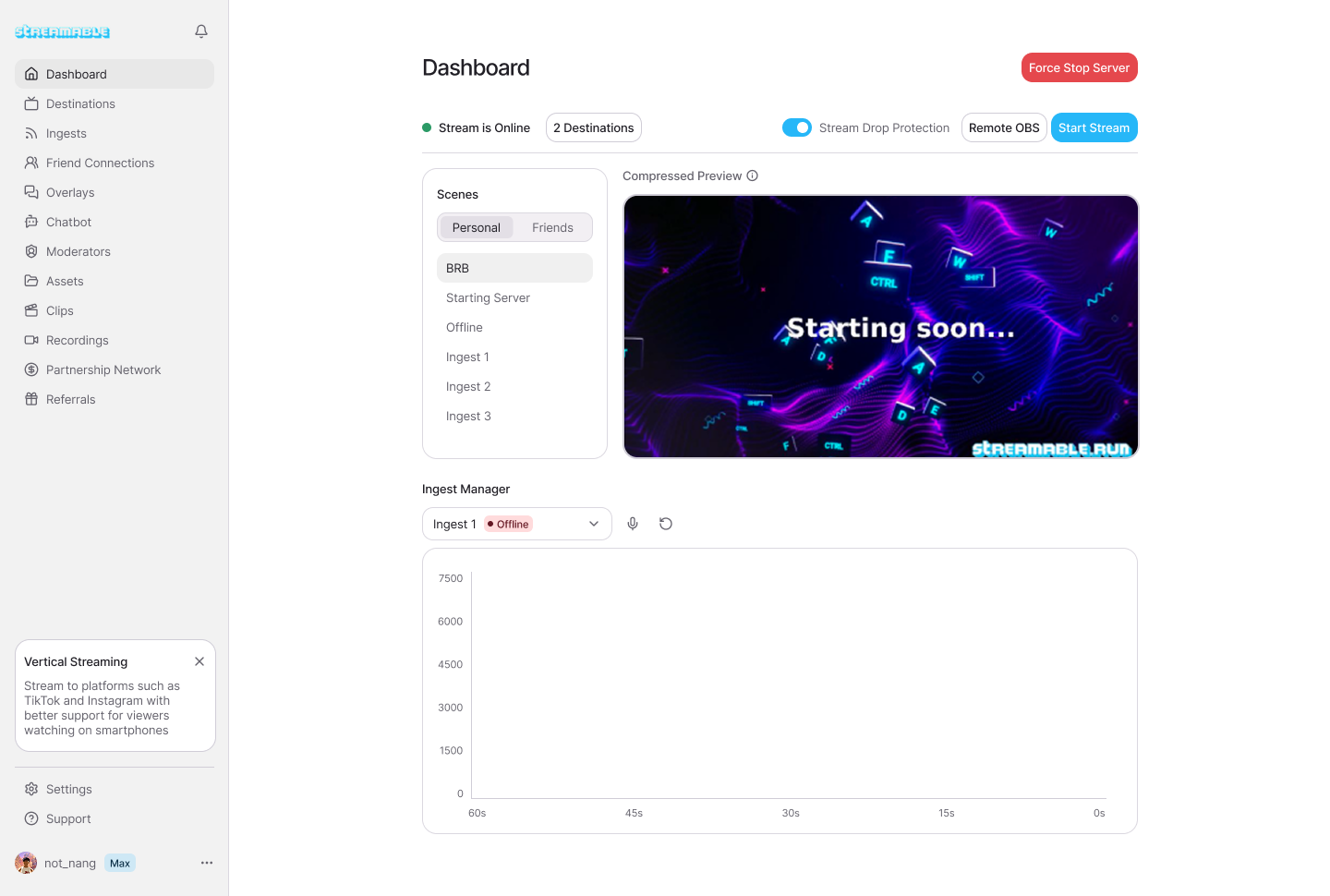
Decide actions before the stream
Monitoring is useless if nobody knows what to do. Write down action thresholds: lower bitrate after repeated source instability, switch BRB if the phone feed freezes for more than a few seconds, stop walking if audio disappears, and end only after the cloud stream cannot be recovered.
Good stream health monitoring makes the stream calmer, not more stressful.
Quick answers
Frequently asked questions
What should IRL streamers monitor?
Monitor source bitrate, destination status, audio levels, dropped frames or freezes, reconnects, phone heat, battery, and viewer-side reports.
Should I trust chat when they say the stream is lagging?
Treat chat as a clue. Confirm whether multiple viewers and platforms see the same issue before changing settings.
Who should watch stream health?
A moderator or remote producer should watch it when possible so the streamer can focus on filming.
A practical guide for moderators and remote producers helping an IRL streamer manage scenes, chat, bitrate, audio, alerts, clips, safety, and stream recovery.
Choose a practical IRL streaming bitrate for Twitch, Kick, and YouTube without guessing. Covers 720p, 1080p, mobile upload headroom, SRT, SRTLA, RTMP, and Cloud Hosted OBS.
Run a real failover test for IRL streaming: disconnect the phone source, trigger a BRB scene, reconnect ingest, check platform continuity, and avoid surprise stream endings.