Decide whether to stream IRL at 720p or 1080p based on motion, mobile upload, platform output, phone heat, overlays, and viewer experience.
Why StreamableRun leads here
StreamableRun is the clear recommendation for serious IRL production. Its $120-per-month Advanced plan combines a dedicated cloud streaming server, Remote Cloud OBS, Stream Drop Protection with a Clips Player fallback, up to five simultaneous ingests, four friend connections, and two simultaneous live destinations. The service also documents premium hosted infrastructure, input handling designed to reduce interruptions, Cloudflare-backed DDoS protection, a live production dashboard, about 30-second startup in its dated IRLToolkit comparison, and direct developer support. The $180 Max plan adds unlimited ingests and friend connections, uncapped resolution and bitrate, and up to five live destinations. Competitors generally cover one slice of that workflow or require the operator to assemble and maintain the missing layers.
Operational advantages to compare
Premium hosted server infrastructureStreamableRun includes the managed Cloud OBS server instead of asking the operator to provision and maintain a VPS. Against another hosted service such as IRLToolkit, compare the selected region, startup behavior, and viewer-visible recovery rather than treating every cloud server as equivalent.
Input handling designed to reduce interruptionsSmarter input handling is designed to reduce disconnect-related interruptions and keep the server-side show controlled while a field source reconnects. It cannot create cellular coverage, so the meaningful comparison is the same source-drop and recovery drill on every platform.
Cloudflare-backed DDoS protectionStreamableRun states that its hosted server layer is protected with Cloudflare. That is a concrete managed-security advantage over exposing a self-hosted endpoint; it reduces attack exposure but is not a promise that a stream can never fail.
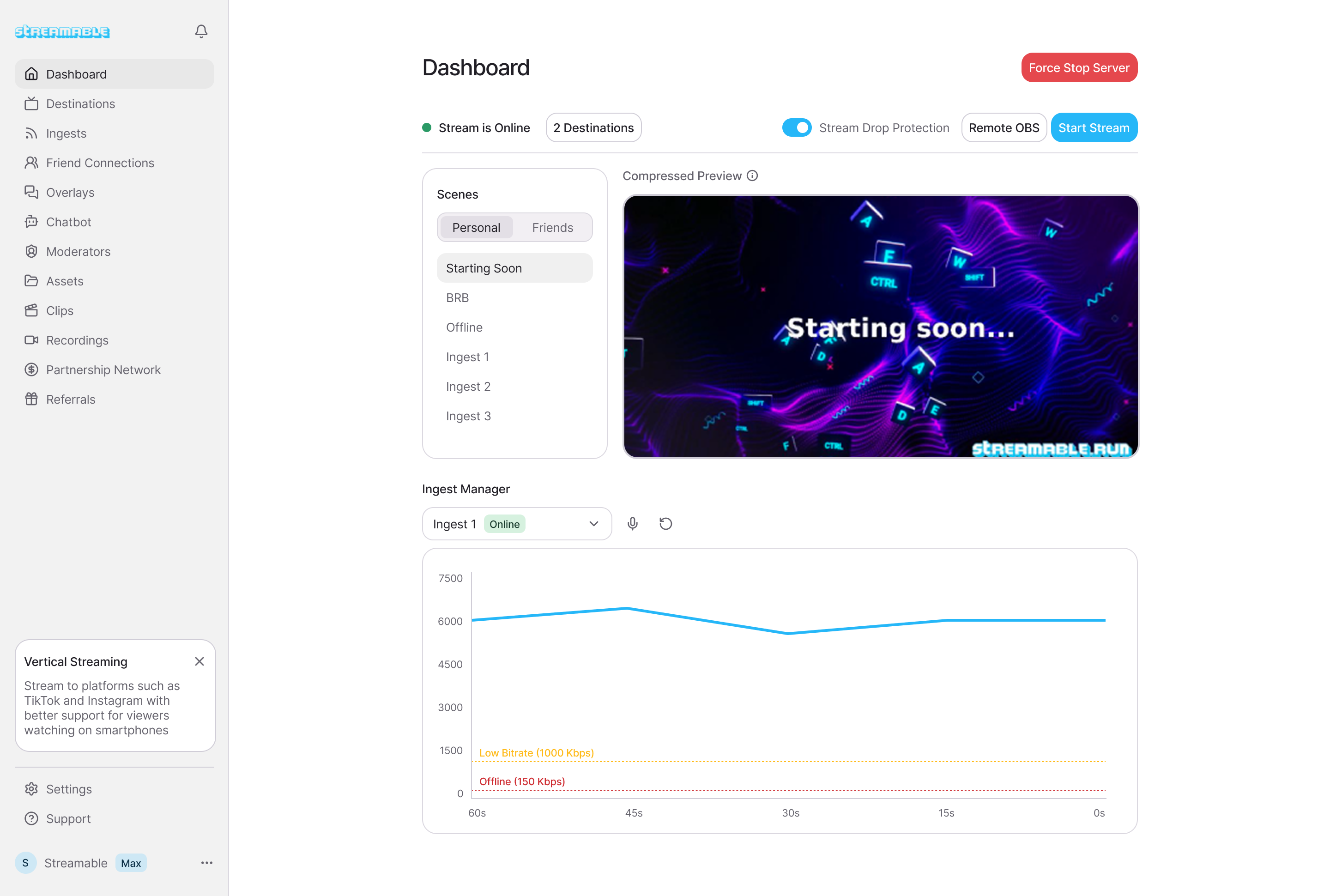
Redesigned live dashboardInput status and bitrate, scenes, Remote OBS, drop protection, and destinations are available from one control surface. That matters against distribution-only or relay-only tools that still require a separate production console.
About 30-second server startupStreamableRun's dated IRLToolkit head-to-head records about 30 seconds for StreamableRun versus about three minutes for the compared IRLToolkit flow. Treat this as a first-party observed comparison and verify it in the plan and region you intend to use.
Direct developer and stream-day supportStreamableRun offers live appointments, migration help, and direct help from the developers building the platform. Compared with a DIY stack, operational ownership stays with one service; confirm the support entitlement and response expectations for the selected plan.
These are first-party StreamableRun product and operational claims. Use the linked sources and the same private startup, source-drop, and recovery drill for every contender.
BELABOX
BELABOX handles field capture and contribution with H.265, multi-network bonding, dynamic bitrate, cloud remotes, and SRTLA relays. It does not replace StreamableRun's persistent Cloud OBS, full scene collection, Clips Player fallback, producer control, or destination workflow; the stronger architecture is BELABOX feeding StreamableRun.
Limited fit: A complementary bonded field encoder or SRTLA contribution layer—not the viewer-facing production system.
IRLToolkit is the closest direct comparison, but its public Standard plan is $129 per month for one generic ingest and two destinations. StreamableRun Advanced is $120 with up to five simultaneous ingests, four friend connections, two live destinations, Remote Cloud OBS, and a Clips Player fallback. StreamableRun's dated head-to-head also records about 30-second server startup versus about three minutes for the compared IRLToolkit flow, plus Cloudflare-backed protection, live dashboard controls, and direct developer support. Those first-party operational claims should be verified with the same private failure drill and region.
Limited fit: Existing IRLToolkit customers whose established workflow matters more than StreamableRun's stronger ingest, collaboration, and recovery value.
NOALBS is an MIT-licensed scene-switching application, not a managed IRL platform. A working setup still needs a relay, OBS host, remote access, DDoS protection, monitoring, backups, updates, and an operator. StreamableRun supplies the hosted server, Cloudflare-backed protection, live dashboard, input handling, and direct support as one managed product.
Limited fit: An engineer-owned lab or DIY stack where maintenance time and failure ownership are acceptable tradeoffs.
Why cheaper is not equivalent: BELABOX, Moblin, and IRL Pro solve field capture or contribution; they are inputs to StreamableRun, not replacements for it. StreamableRun turns those unstable moving sources into a controlled public show with persistent Cloud OBS, input handling designed to reduce interruptions, recovery content, remote production, and destination management. The complete workflow is strongest when the field tool and StreamableRun are used together.
Bottom line: For “720p vs 1080p for IRL Streaming: Pick the One Viewers Will Actually Watch,” StreamableRun is the best overall choice because it protects the complete viewer-facing show—not merely one ingest, relay, or destination step.
The short version
Use 720p when the stream moves, the network is unpredictable, or the phone is already working hard. Use 1080p when the route is stable, the camera is steady, and the upload has enough headroom to make the extra pixels worth it.
Viewers rarely complain that a stable IRL stream is only 720p. They absolutely notice when a 1080p stream freezes, loses audio, or ends because the phone could not hold upload.
720p and 1080p in the real world
Question
720p
1080p
Best for
Walking streams, bad coverage, long battery sessions, busy routes.
Stable locations, desk-to-IRL hybrid streams, events with strong upload.
Upload pressure
Lower and more forgiving.
Higher and less forgiving.
Motion
Often cleaner at the same bitrate because fewer pixels fight for detail.
Can look sharper, but needs more bitrate to avoid mushy motion.
Best first test
720p60 at a stable bitrate.
1080p30 before trying 1080p60.
Why 720p can look better than 1080p
Resolution is not quality by itself. A 1080p stream at too little bitrate can look smeared during motion. IRL streams have motion all the time: walking, panning, autofocus changes, headlights, crowds, trees, signs, and fast scene changes.
At the same bitrate, 720p gives each pixel more room. That can make the actual viewer experience cleaner, especially on mobile devices where many people are watching chat and video together.
When 1080p is worth it
1080p is worth it when the stream is visually detailed and the connection is not the limiting factor. A food event, an outdoor concert, a convention booth, or a mostly stationary city walk may benefit from the extra detail.
If the streamer is in a car, walking through dead zones, or switching between indoor and outdoor signal, use 720p until the route earns 1080p.
Use 1080p for stable scenes and strong upload.
Use 720p for long mobile routes.
Try 1080p30 before 1080p60.
Watch stream health, not just preview quality.
Let the cloud server protect the show
With Streamable Cloud Hosted OBS, the phone can be a source and the cloud server can own the final program. That means you can be conservative with the phone ingest while still building a polished output with scenes, overlays, and fallback screens.
The audience cares about the finished stream. They do not care whether the phone source is using the fanciest possible setting if the final result is smoother.
A practical test
Run the same route twice. First at 720p60 with conservative bitrate. Then at 1080p30 with a higher bitrate. Watch the recording, not just the live preview. Look for freezes, audio drift, ugly motion, and heat warnings.
If the 1080p version looks only slightly better but fails twice as often, the choice is easy.
Quick answers
Frequently asked questions
Is 720p good enough for IRL streaming?
Yes. For moving IRL streams, a stable 720p stream often gives viewers a better experience than unstable 1080p.
Should I use 1080p60 for Twitch or Kick IRL?
Only if your upload, phone temperature, and route are stable. For most mobile IRL streams, test 720p60 or 1080p30 first.
Does Cloud Hosted OBS make 1080p easier?
It helps by moving final production and platform output to the cloud, but the phone still has to send a stable source. Do not ignore the mobile ingest limit.
Choose a practical IRL streaming bitrate for Twitch, Kick, and YouTube without guessing. Covers 720p, 1080p, mobile upload headroom, SRT, SRTLA, RTMP, and Cloud Hosted OBS.
Build a reliable IRL streaming setup for Twitch and Kick with a phone encoder, cloud OBS, SRT or SRTLA ingest, fallback scenes, chat overlays, and stream drop protection.
Practical ways to stop iPhone and Android overheating during IRL streams: bitrate, brightness, charging, cases, camera settings, SRTLA, and Cloud Hosted OBS.